
Oil and gas operations
SCM Operations LLC / Salt Creek
How Salt Creek brought governed AI to invoice validation
Salt Creek engaged Avatar and PraxisIQ to modernize accounts payable, turning the team’s validation rules into a repeatable, auditable AI workflow.
Who did what.
Salt Creek
AP and field subject-matter experts defined the validation rules and kept approval authority.
Avatar
Engaged by Salt Creek to modernize accounts payable and led the customer engagement.
PraxisIQ
AI implementation partner that worked with Avatar and Salt Creek to build the workflow.
Invoice validation depended on rules that lived with a few experienced people.
- 01Invoices had to be checked against purchase orders and work orders across several systems.
- 02Validation rules were applied by hand, so results depended on who did the review.
- 03The PO/WO queue stayed large, and exceptions surfaced late.
Claude agents do the validation work. A person stays accountable.
Claude agents perform invoice-validation tasks alongside a human operator, organized into three components.
- 01
Invoice validation orchestration
Coordinates the review, tracks required actions and exceptions, and checks that each step is complete.
- 02
Business Central reconciliation
Applies Salt Creek's rules to invoice and PO/WO comparisons and identifies discrepancies.
- 03
Budget Sheet finalization
Applies approved workbook updates while preserving formatting and coding rules.
Workflow at a glance
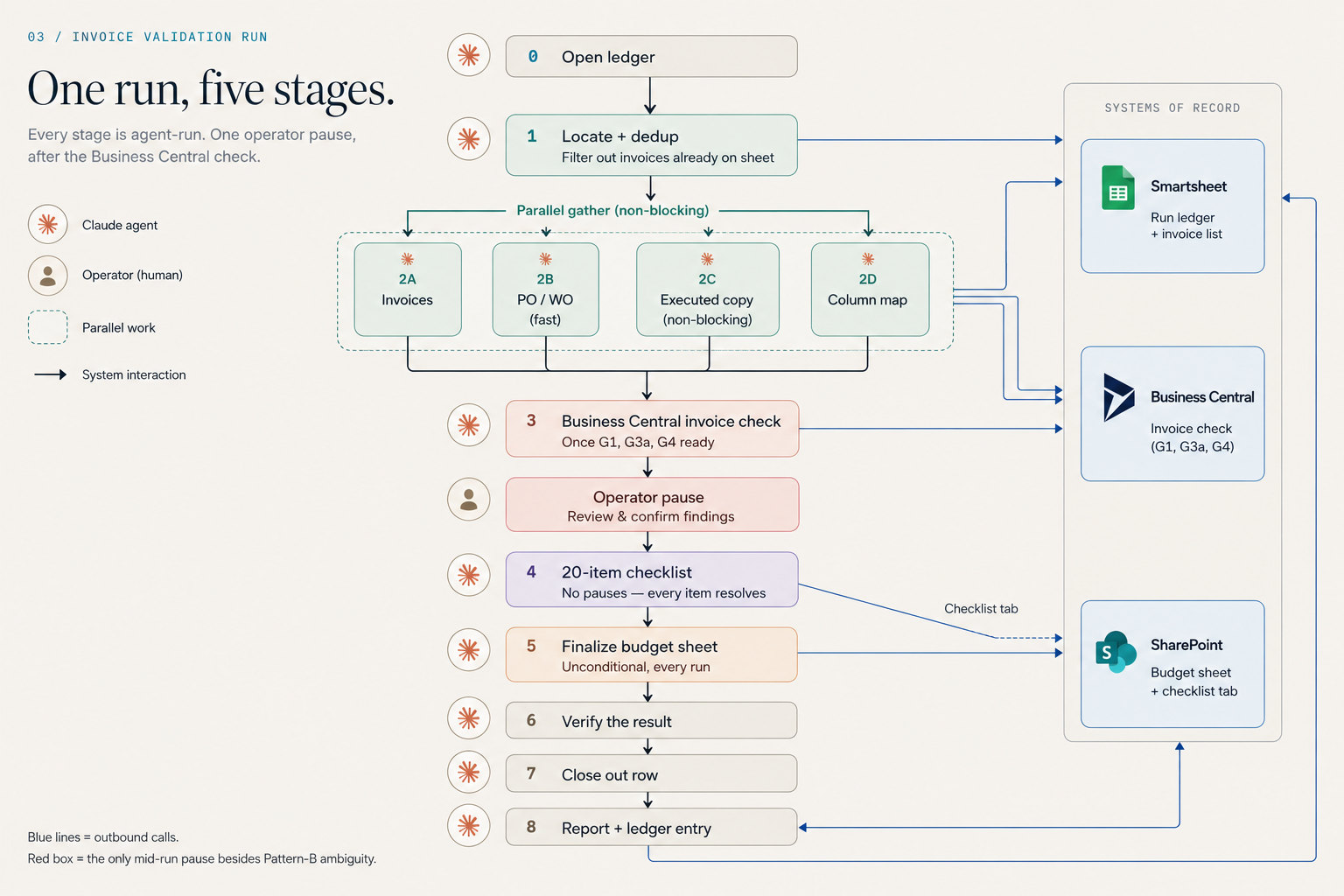
Who does each part of the work, and where the records live.
Systems of record
- Smartsheet: Run Ledger and invoice list
- Microsoft Dynamics 365 Business Central: reconciliation
- SharePoint: Budget Sheets and checklists
Claude agents
- Orchestrate the validation run and track exceptions
- Compare invoices with PO/WO data and flag discrepancies
- Prepare approved Budget Sheet updates
Human operator
- Reviews exceptions at the checkpoint
- Explicitly approves changes to existing financial data
- Decides on suggested process changes
Inside the invoice validation workflow
Claude agents coordinate invoice review across Smartsheet, Microsoft Dynamics 365 Business Central, and SharePoint, with a human checkpoint to review and confirm findings.
Two different scopes, labeled separately.
Overall production tracker
- 399
- Invoice records
- 291
- Distinct purchase orders and work orders
- $7,090,468.37
- Total invoice value under management
Value under management in the tracker. This is not an amount reviewed, validated, paid, or saved. At the time of review, 137 records (34%) were checklist-complete; this is a historical snapshot, not a current completion rate.
Workflow development and validation
- 5
- PO/WO test groups
- 41
- Live production invoices
- $186,281.22
- Invoice value
“We’re down to about 30 PO/WOs left to process. I’ve never seen fewer than 150 in the queue. This workflow is already making a massive difference in the time it takes to get through the work.”
The queue comparison of approximately 150 to approximately 30 is a customer-reported observation. It is not a measured time saving, cost saving, or return on investment.
Controls built into the workflow.
- Required steps are documented in a Run Ledger.
- Suggested process changes are logged for review rather than adopted automatically.
- New records can be added automatically within the approved workflow.
- Changes to existing financial data require explicit human approval.
- Versioned fixes and retained earlier versions support maintenance and rollback.
- The workflow includes a human review checkpoint. It does not execute payments.
- Delivered today
- A governed invoice-validation workflow with Claude agents, a Run Ledger, and human approval for changes to existing financial data.
- Planned next
- Possible extension to additional vendors, sites, and related review queues, subject to Salt Creek's priorities.
Where FuseIQ fits.
FuseIQ is PraxisIQ's platform for ranking, governing, and measuring AI workflows across a portfolio. It is a related PraxisIQ offering; the Run Ledger and workflow controls described above were implemented for this engagement.
FuseIQ
Find the next workflow worth changing.
See how PraxisIQ combines FuseIQ, forward-deployed engineering, and governed AI delivery around measurable operating outcomes.